Timekeeping Employee Portal Training Videos
Your Employee Portal and mobile app offer access to commonly needed items, like your time card, schedule, and time off balance. The videos in this article walk you through each tab and explain their use. IMPORTANT: Certain features shown in these videos may not be available in your employer's system.
Employee Portal Navigation
Updated 12/6/2019
This video explains the basics, including how to:
- Login.
- View and approve your time card.
- Add/update your email and phone.
- Check your schedule.
Use the WebClock
Updated 12/6/2019
The WebClock is a type of time clock used for punching in and out. You may or may not have access to the WebClock depending on your employer's setup. You may also be able to clock in via the mobile app. This video explains how punch in and out on either device. However, in the case of the mobile app, you do not need to log in every time you need to punch in and out, opening the app is all that's necessary.
Request Time Off
Updated 1/22/2020
Requesting time off can be done in both the Employee Portal and mobile app. The first video demonstrates how to:
- Check the departmental time off calendar.
- Check your balance.
- Make a single day request.
- Withdraw a request.
In this second time off video, you'll learn how to:
- Make a partial day request.
- Include weekend days in a multi-day request.
- Set up email notifications related to your time off request.
Drop and Pick Up Shifts
Added 12/6/2019
With TimeSimplicity scheduilng, you may have the ability to drop and pick up shifts through the Employee Portal. This video shows how that's done and also, how to enable notifications associated with the process.
Reset Your WebClock/Employee Portal Password
Updated 12/6/2019
If you forget your password for the WebClock and Employee Portal, the login will present a "Forgot Password" option after an unsuccessful login.
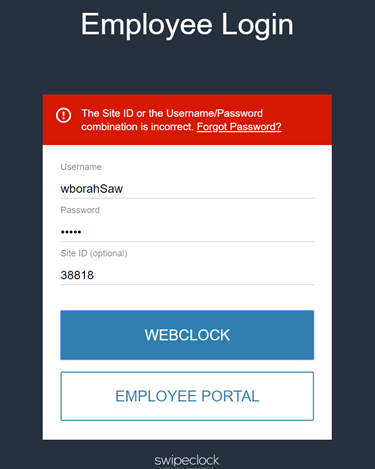
IMPORTANT: You will need an email linked to your account to self-reset a forgotten password.